Showing posts with label Internet Download Manager. Show all posts

Sunday, December 29, 2013

Fix 12/30/13 | "IDM has been registered with a fake Serial Number"!


I am back with an amazing tutorial on a very common problem faced by everyone in these days. Few weeks back Tonec.Inc released it's new Internet Download Manager 6.18 build 7. It was working fine but later on it started to give the users error "IDM is registered with fake serial key." Although this time it does not exit but after several minutes it gave this error again and again, this was very much annoying!


You all should be having this problem. You must tried hundreds of patches and cracks and you have re-installed Internet Download Manager again and again so that this problem could be recovered but every time you failed!

In this tutorial I will provide you a complete guide on how to fix Internet download Manager fake serial number error permanently!
Let's start the tutorial,


Steps Involved: 


Step 1: Download and install the Internet Download Manager from here or if you have already installed then it's okay! 

Step 2: If you have installed IDM from link provided check for updates and update your IDM. Now after you have done, it will show an error message that you have registered IDM using fake serial key and IDM will exit. Now here the method starts.

Step 3:
For Win XP(God bless your soul):
Go to START --}} Then go to RUN and type the following text and click enter:
notepad %windir%\system32\drivers\etc\hosts

For Win Vista/7/8:
Here it is little bit trick!!
Run "Notepad" and through "Notepad"  (--> Files-->Open-->)
First of all go to C:/ drive, then go to "Windows" Folder and then go to "System32" folder and then go to "Drivers" folder and then go to "Etc" Folder, in the "Etc" folder you will see the "hosts" file open it.
Here are the screenshots for your ease!


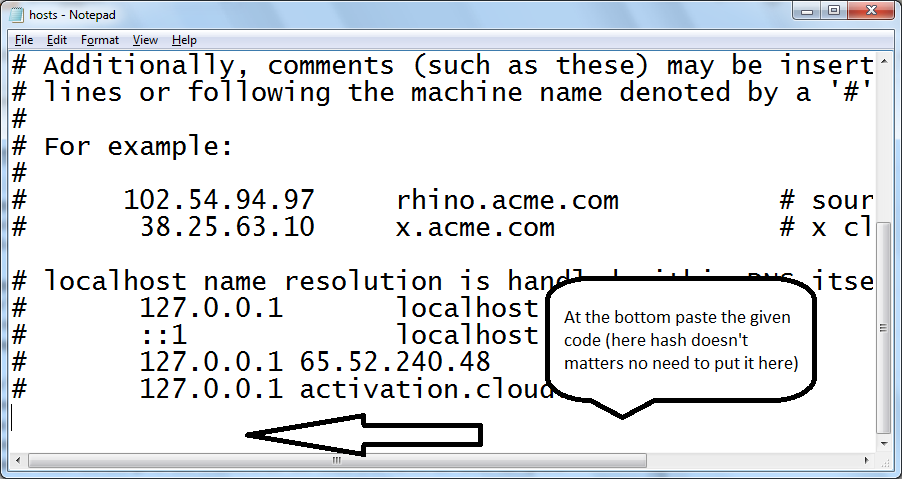
Step 6: Now at the bottom as shown above, place the code given below (copy the code select the code by pressing "Ctrl+C") :
127.0.0.1 tonec.com
127.0.0.1 www.tonec.com
127.0.0.1 registeridm.com
127.0.0.1 www.registeridm.com
127.0.0.1 secure.registeridm.com
127.0.0.1 internetdownloadmanager.com
127.0.0.1 www.internetdownloadmanager.com
127.0.0.1 secure.internetdownloadmanager.com
127.0.0.1 mirror.internetdownloadmanager.com
127.0.0.1 mirror2.internetdownloadmanager.com

After adding these piece of code, save the notepad file. And exit from there.
Now start your Internet download manager, and now you IDM has been converted to full version and specially when you update next time, your registration will not expire. That means it will remain full version for life time and you can update it without any problem.

If this problem this happens then don't worry there is a last attempt!I will post that in my new post stay tuned....for 1 hour!

 KEEP VISITING MY BLOG....
Don't forget to Like, Share & Subscribe! :) 

Sunday, December 22, 2013

Downloading Torrents with IDM using Zbigz.com (3)


I am continuing the series of tutorials concerning downloading torrents directly using internet download Manager and this time I will be able to justify you on a way to download the torrent files using Zbigz.com.
Through this tutorial I will be able to offer you an entire guide that while not using any torrent client like utorrent , torrent lord , vuze, bitorrent and etc. you'll download torrents directly!


In my previous tutorial I gave you some of the limitations of he free account on Zbigz:
Download file size : 1 GB
Speed limit : 150-200 KBps
Monthly bandwidth : no bandwidth
Storage age : no storage


About Site: When ever you will download any torrent through this site you will get a download of 150-200 Kpb as a free user but unlimited speed as a premium user, you will get no monthly bandwidth but in premium you are given monthly bandwidth and when you will download your torrent should not be greater than 1 GB but in premium you can exceed from 1 GB limit!


HOW TO DOWNLOAD WITH ZBIGZ:
1. Signing up: After you have searched for a torrent, you need to goto Zbigz in order to download it with IDM. When you have opened Zbigz's site simply sign up for a free account or you can go for a premium account.

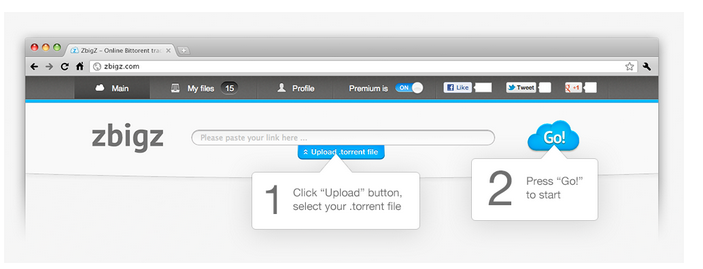
2. Uploading Torrent: You can [1]upload torrent file from your PC which you have already downloaded or you can copy the magnet link of the torrent and paste it on the "Paste your link here" tab.


3. Downloading: Now after you have uploaded or pasted the torrent link click on "GO"[2] to proceed to start downloading.

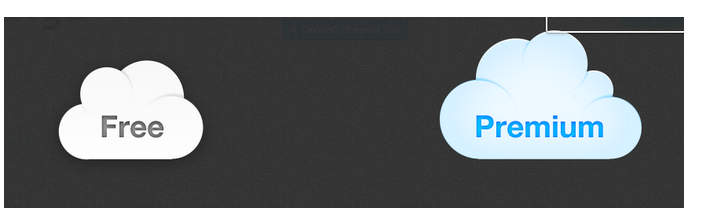
3.2 Free or Premium: When you will click on "GO" a window will popup and ask for Free or Premium. Depending on your account type select any of the options. If you have a "Free account" click on free and if you have a "Premium account" click on "Premium".


3.3 Why downloading online?: After these all processes Zbigz will search for the torrent itself and start downloading it in it's server online. When the online download download is over you'll have to click on "zip" button to start the download with IDM!


Tip:"Through my own suggestion this site is not good for the free users, the users who can afford the premium they can enjoy the site's benefits! Check for other sites I have mentioned..."

Download Torrents with IDM using Boxopus.com(4)


Hey friends, I'm back continuing the series of tutorials regarding downloading torrents on to your computer with none software package or torrent client. Now I will be able to show that how you'll download torrents with Boxopus that was the last website in my provided list in the previous tutorial. Boxopus is another cloud torrent downloader which allows torrents to be downloaded on-line while not using any softwares like utorrent, bittorrent, vuze, bitlord etc.


Before this I gave you the limits of the site which were:
Download file size : 2.5 GB
Speed limit : Unlimited
Monthly bandwidth : 2.5 GB/hour
Storage age : 1 day

About Site:

These limits means that whenever you will download through this site you will get unlimited download speed, you will be given a bandwidth of 2.5 GB/hour (your bandwidth will be recharged every hour) and the size of your download should be < or equal to 2.5 GB.

HOW TO DOWNLOAD TORRENTS USING BOXOPUS:
I have provided screenshots which will help you understand easily!

1. Signing up:
 Goto Boxopus.com you will see two logging methods one is signing in with facebook or register. It is better to login with facebook account because it is easy and saves time. To login with facebook click on that button and do all the facebook credentials to get access.


2. Adding Torrents: To add torrent, first search the torrent you need, after that goto Boxopus.com and click on
Add Torrent tab[1]. Now you will see two new tabs ("From .torrent file" and "Magnet link or url")[2]All you need is to pick a torrent file from you PC[3] which you already have downloaded or copy its magnet link or even paste torrent page URL. After that Boxopus will show you torrent files and begin downloading.


2.5. What is green line? : The line[1] is indicating the available bandwidth which will be reduced to the size of downloaded torrent every time you download; but don’t worry, it is augmented every hour!


3. Downloading Torrent: After your torrent is added[1], Boxopus sends you a notice. To have this torrent on your computer click on download[2] to download the whole torrent ; it stores your torrent for 1 day.


Friday, December 20, 2013

Download torrents using IDM with Furk.net (2)


This is my second tutorial on downoading torrents with Internet Download Manager. This time I will show you on how to download download through FURK.NET


In the previous tutorial I gave you some of the limitations of this site which were:
  1. Download file size : 2 GB
  2. Speed limit : Unlimited
  3. Monthly bandwidth : 250 GB
  4. Storage age : No limit! 

About the Site:
When you are downloading any torrent through this site you will get unlimited speed, your torrents will be saved on the site for a long time, you will get 250 GB of bandwidth per month and the size of the torrent you would download should be < or equal to 2 GB.


Now to download torrents:


1. Signup: For registration on the site you need a voucher or invite code, but it is better you should signup with your Facebook account (invitation code is not required for the Facebook users).


Sign up steps:


  • Go to Furk.net
  • Click on Facebook icon.
  • Enter your Facebook credentials.
  • Do all the login formalities to access Furk with facebook.
  • Click on Register.

2. After Logging in: Now you can see your Furk account. Click on My Files (Tab link at top middle).

3. Downloading: Search the torrent you want to download with IDM and then on Furk.net click on "New" tab. Here you will see two options to upload the torrent file. You can put the direct url of the torrent or simply you could upload your local torrent file by choosing the file in the second option. Choose the best option you want. To put url copy the magnet link of the torrent and paste it on Furk.net. To upload torrent, first download the torrent file and then click on choose file and select the torrent file you have downloaded.

3.2 Completing Download: Click on Add Download. Your file will directly send to Download page where you could see  green download button immediately click on it and your file will start to download with IDM. If your torrent is slow you could see it in the Active tab.

We will continue our tutorials and will meet in the next tutorial regarding download torrents with Zbigz.com.

Tips: Always choose to copy and paste the url of the torrent. Always download torrents with large number of Seeds and Peers. After adding torrents never wait for the screenshots immediately click on download button otherwise you will face some difficulties.


Tuesday, December 17, 2013

Download torrents with Internet Download Manager! (1)


Hello friends, today in this tutorial I will teach you on how to download Torrent files using your Internet Download Manager with resume capability! You can perpetually get a worst download speed once downloading any torrent even if it is having a ton of seeders or you are using a premium torrent downloader! There speed will never get to the rank of Internet Download Manager. 


I will be offering you some sites that create your work straightforward in no value -free!

The method of using such sites is the same thus i will be able to show you the downloading method of all the site I use the foremost and they are 100 percent reliable with no speed limitations.

One factor I would like to say is that from these sites as a free user you'll be able to solely download files up to 2 GB with fully speed. This can be the only limitation. However this can be very useful when you wanna download a newly released movie and it's rather more lechers than it's seeders and also the speed is null. I use them to download softwares and films as there size ne'er exceed from the limit!

"NOTE : In this tutorial you will only learn about the sites and their benefits and in the next tutorials you will learn on how to download from them! But in next tutorials, as we will move up I will also show you how you can download from them"

So here's the list:

1. FURK.NET

Furk is peer-to-peer file sharing protocol server and a search engine.


ZBIGZ – A power to torrents! zbigz - is website that allows you to download Torrent files through FTP via web browser.

3. BOXOPUS.COM


Boxopus is a  service that enables people to download torrents directly to their Dropbox account.

These are all the foremost used and reliable sites that I in person use.Now here are their limitations:

Furk.net :

Download file size : 2 GB
Speed limit : Unlimited
Monthly bandwidth : 250 GB
Storage age : No limit!

Zbigz.com :

Download file size : 1 GB
Speed limit : 150-200 KBps
Monthly bandwidth : no bandwidth
Storage age : no storage

Boxopus.com :

Download file size : 2.5 GB
Speed limit : Unlimited
Monthly bandwidth : 2.5 GB/hour
Storage age : 2 days

Through my own experience Furk.net is the best online peer-to-peer cloud downloading site!

We will continue our tutorials and will meet in the next tutorial regarding on how to download torrent files using these sites.


Sunday, November 3, 2013

Optmize IDM to urge stronger download!

In this post i will be able to allow you to understand that you simply will optimize your Internet Download Manager (IDM) speed/performance even better!

Ok, lets start....


When you build any transfer from IDM, IDM itself connects eight| servers of the positioning from wherever you're downloading the info (means it downloads the info into 8 parts). Which can be aforesaid stronger however to build it more stronger we are going to make IDM to attach to sixteen servers..........

To do so, follow the directions below with the screenshots:

1. Open IDM and click on on options.

2. Currently click on the "Connection" tab.

3. Select "LAN 10Mbs" from "Connection Type/Speed".


4. At last, from "Default max. conn. number" select sixteen & then click on "OK".


You are done currently IDM can build sixteen connections to the transfer web site once out there and your transfer are going to be optimized!


Saturday, November 2, 2013

Download Internet Download Manager (IDM) 6.18 Bulid 5 with patch/crack

Internet Download Manager v6.18. Added Windows 8 compatibility. Fixed compatibility problems with different browsers including Internet Explorer 10, all Mozilla Firefox versions up to Mozilla Firefox Aurora, Google Chrome. Improved FLV grabber to save videos from web players on web pages, Google Video, MySpace TV, and other popular sites!


Internet Download Manager (IDM) is a tool to increase download speeds by up to 5 times, resume and schedule downloads. Comprehensive error recovery and resume capability will restart broken or interrupted downloads due to lost connections, network problems, computer shutdowns, or unexpected power outages. Simple graphic user interface makes IDM user friendly and easy to use.Internet Download Manager has a smart download logic accelerator that features intelligent dynamic file segmentation and safe multipart downloading technology to accelerate your downloads. Unlike other download managers and accelerators Internet Download Manager segments downloaded files dynamically during download process and reuses available connections without additional connect and login stages to achieve best acceleration performance.

  In order to download the software please watch the video below which a tutorial...


Download Link:-

http://adf.ly/3117946/idm-with-patch

Installation instructions are inside the file you have downloaded....


Copyright @ 2014 Crack Your IDM!.

Designed by Wajahat Mahar & Sponsored By MrWaji39 Tuts